
유리의 개발새발
[RN] Firebase FCM 02 본문
지난 시간에는 RN 앱에 Firebase SDK를 붙여봤습니다.
이번에는 백엔드에서 FCM을 직접 호출하는 부분을 구현해 보겠습니다.
(저는 애플 개발자 계정이 없으니, Android 기준으로만 테스트합니다 🙏)
1. Firebase Admin 설정
- Firebase 콘솔 → 프로젝트 개요 → 프로젝트 설정 → 서비스 계정
- “새 비공개 키 생성” 버튼 클릭 → JSON 키 파일 다운로드
- 이 파일을 Express 프로젝트 루트에 둡니다.
이 키가 백엔드에서 Firebase Admin SDK를 초기화하는데 사용됩니다.
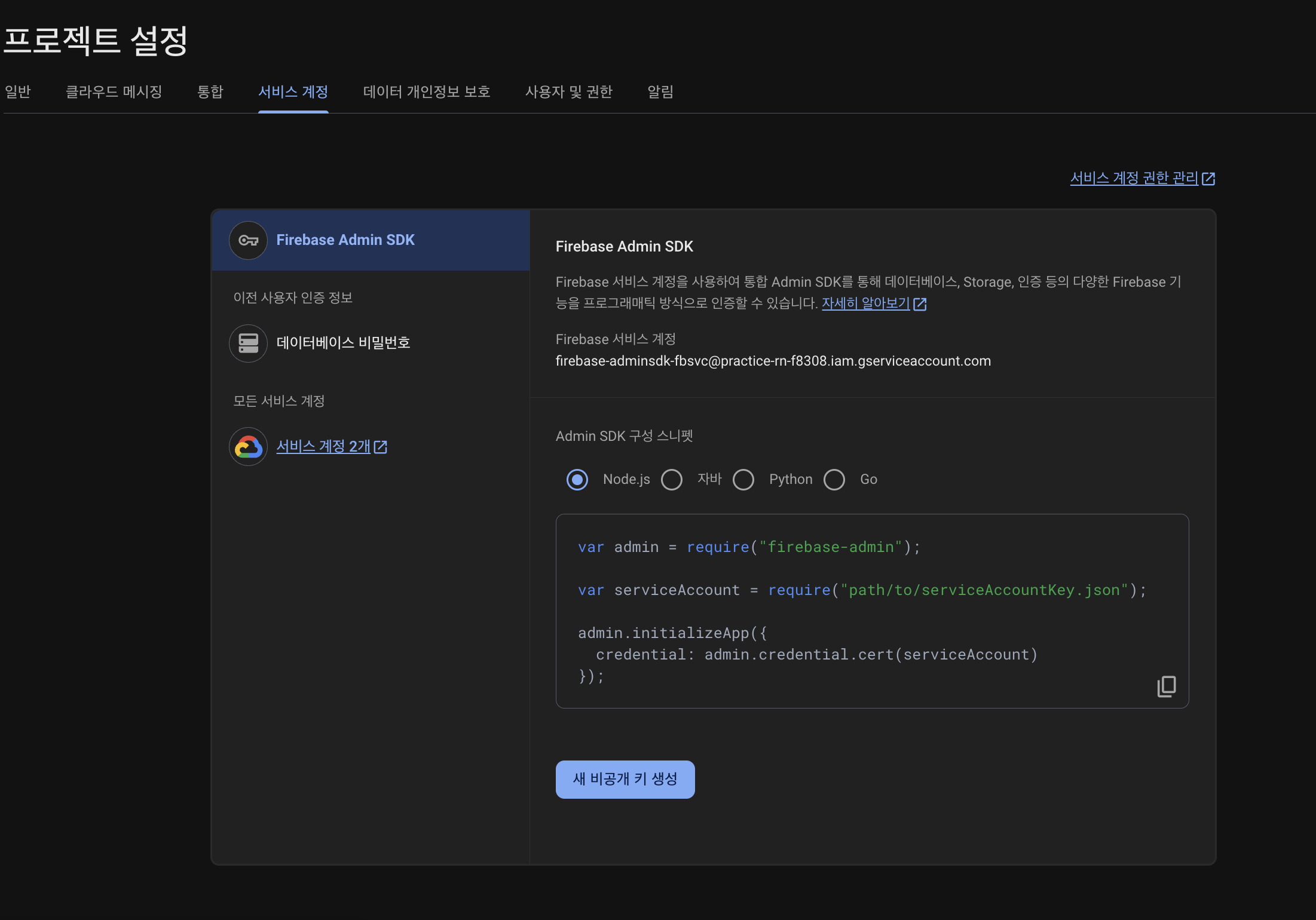
Springr과 Express 중... 음..... Express로 하겠습니다!
Node.js로 설정하고 다운ㄱㄱ
그리고 그걸 백엔드 프로젝트 루트에 둡니다!

다음으로 패키지 설치
npm i firebase-admin cors
firebase.js 파일을 만들어 Firebase Admin 초기화 코드를 작성합니다.
const admin = require("firebase-admin");
const serviceAccount = require("./practice-rn-xxxx-firebase-adminsdk.json");

admin.initializeApp({
  credential: admin.credential.cert(serviceAccount),
});

module.exports = admin;
이제 이 admin 객체를 가져다 쓰면 admin.messaging() 같은 메서드로 FCM을 전송할 수 있습니다.
3. Express 서버 app.js
라우터를 등록합니다
var express = require("express");
var path = require("path");
var cookieParser = require("cookie-parser");
var logger = require("morgan");
var cors = require("cors");

var indexRouter = require("./routes/index");
var usersRouter = require("./routes/users");
var fcmRouter = require("./routes/fcm"); // 추가

var app = express();

app.use(cors()); // 클라이언트에서 호출하려면 열어두기(필요 시 도메인 제한)
app.use(logger("dev"));
app.use(express.json());
app.use(express.urlencoded({ extended: false }));
app.use(cookieParser());
app.use(express.static(path.join(__dirname, "public")));

app.use("/", indexRouter);
app.use("/users", usersRouter);
app.use("/fcm", fcmRouter); // 추가

module.exports = app;
4. FCM 라우터 구현
이제 핵심 로직입니다. routes/fcm.js
const express = require("express");
const admin = require("../firebase");
const router = express.Router();

// 데모용 토큰 저장소 (실서비스라면 DB를 써야 합니다)
const deviceTokens = new Set();

// --- 1. 토큰 등록 ---
router.post("/register-token", (req, res) => {
  const { token } = req.body || {};
  if (!token) return res.status(400).json({ error: "token required" });
  deviceTokens.add(token);
  console.log("[register-token]", token);
  res.json({ ok: true });
});

// --- 2. 단일 토큰 알림 푸시 ---
router.post("/send", async (req, res) => {
  const { token, title, body, data } = req.body || {};
  if (!token) return res.status(400).json({ error: "token required" });

  const message = {
    token,
    notification: { title: title || "Hello", body: body || "From Express" },
    data: stringifyValues(data),
    android: { priority: "high", notification: { channelId: "default" } },
    apns: { headers: { "apns-priority": "10" }, payload: { aps: { sound: "default" } } },
  };

  try {
    const id = await admin.messaging().send(message);
    res.json({ ok: true, messageId: id });
  } catch (e) {
    console.error(e);
    res.status(500).json({ ok: false, error: String(e) });
  }
});

// --- 3. 단일 토큰 데이터-only 푸시 ---
router.post("/send-data", async (req, res) => {
  const { token, data } = req.body || {};
  if (!token) return res.status(400).json({ error: "token required" });

  const message = {
    token,
    data: stringifyValues(data) ?? { title: "Data-only", body: "local notification" },
    android: { priority: "high" },
    apns: { headers: { "apns-priority": "10" }, payload: { aps: { "content-available": 1 } } },
  };

  try {
    const id = await admin.messaging().send(message);
    res.json({ ok: true, messageId: id });
  } catch (e) {
    console.error(e);
    res.status(500).json({ ok: false, error: String(e) });
  }
});

// --- 4. 토픽 구독/해제 & 발송 ---
router.post("/subscribe", async (req, res) => {
  const { token, topic } = req.body || {};
  if (!token || !topic) return res.status(400).json({ error: "token & topic required" });
  await admin.messaging().subscribeToTopic([token], topic);
  res.json({ ok: true });
});

router.post("/unsubscribe", async (req, res) => {
  const { token, topic } = req.body || {};
  if (!token || !topic) return res.status(400).json({ error: "token & topic required" });
  await admin.messaging().unsubscribeFromTopic([token], topic);
  res.json({ ok: true });
});

router.post("/send-topic", async (req, res) => {
  const { topic, title, body, data } = req.body || {};
  if (!topic) return res.status(400).json({ error: "topic required" });

  const message = {
    topic,
    notification: { title: title || "Topic title", body: body || "Topic body" },
    data: stringifyValues(data),
    android: { priority: "high", notification: { channelId: "default" } },
    apns: { headers: { "apns-priority": "10" }, payload: { aps: { sound: "default" } } },
  };

  try {
    const id = await admin.messaging().send(message);
    res.json({ ok: true, messageId: id });
  } catch (e) {
    console.error(e);
    res.status(500).json({ ok: false, error: String(e) });
  }
});

function stringifyValues(obj) {
  if (!obj) return undefined;
  const out = {};
  for (const [k, v] of Object.entries(obj)) out[k] = String(v);
  return out;
}

module.exports = router;
5. 엔드포인트별 기능 요약
| POST /fcm/register-token | 앱이 발급받은 FCM 토큰 등록 | { "token": "abc123", "platform": "android" } |
| POST /fcm/send | 단일 기기에 알림(Notification) 푸시 | { "token": "abc123", "title": "안녕", "body": "테스트" } |
| POST /fcm/send-data | 단일 기기에 Data-only 푸시 (앱에서 직접 알림 표시 필요) | { "token": "abc123", "data": { "chatId": "42" } } |
| POST /fcm/subscribe | 특정 토큰을 토픽에 구독 | { "token": "abc123", "topic": "news" } |
| POST /fcm/unsubscribe | 토큰을 토픽에서 구독 해제 | { "token": "abc123", "topic": "news" } |
| POST /fcm/send-topic | 토픽 구독자 전체에 알림 발송 | { "topic": "news", "title": "속보", "body": "RN 0.81 출시!" } |
저 엔드포인트의 역할은 알겠는데 어디서 쓰이는가가 와닿지가 않을 수 있죠?
1. 앱이 발급받은 FCM 토큰 등록 왜 해야됨?
- 토큰 = 기기/앱을 식별하는 주소 같은 거예요.
- FCM 서버는 “누구한테 보낼지”를 토큰으로 구분합니다.
- RN 앱이 처음 실행될 때 messaging().getToken()으로 토큰을 받아오죠.
- 그걸 서버(Express)로 등록해둬야, 백엔드에서 특정 사용자 기기로 푸시를 보낼 수 있음.
- 실서비스에서는 이 토큰을 DB에 userId랑 매핑해서 저장해요.
- 예: userId=123 → token=xyzabc…
- 그래야 “userId 123번한테 알림 보내” 같은 로직이 가능하죠.
2. 단일 기기에 알림(Notification) 푸시
- 이건 서버에서 특정 기기 하나한테 직접 푸시 쏘는 것이에요.
- Firebase Admin SDK(admin.messaging().send())를 이용해서 Express API 호출 → Firebase → 기기로 가는 구조.
- "어드민 페이지"라기보다, 보통은 백엔드 비즈니스 로직에서 트리거해요.
- 예: A가 B한테 채팅을 보냄 → 서버에서 B의 토큰 찾아서 /send 호출 → B 기기에 알림.
3. 단일 기기에 Data-only 푸시
- 이것도 마찬가지로 서버에서 쏩니다.
- 차이는 알림(Notification) 객체가 없고 data만 담음.
- 그래서 OS가 자동으로 알림을 띄워주지 않아요.
- 앱이 이 데이터를 받아서 직접 Notifee 같은 라이브러리로 알림 표시해야 함.
- 주로 “앱이 열려 있을 때만 특정 UI를 갱신” 같은 데 많이 씀.
- 예: “새 메시지가 왔다 → 리스트를 리프레시 해라”
4.특정 토큰을 토픽에 구독
- 이게 사실상 알림 설정 기능이라고 보면 돼요.
- 토큰을 특정 토픽에 묶어두면, 나중에 서버가 /send-topic으로 쏠 때 그 토픽 구독자 전부가 알림을 받아요.
- 예:
- user1, user2, user3 → topic = “event-news” 구독
- 서버가 “event-news”로 알림 쏘면 세 명 모두 알림 받음.
- 흔히 “카테고리 구독”, “공지 알림 받기” 같은 기능에 활용됨.
5. 토픽 구독자 전체에 알림 발송
- 이것도 “어드민 페이지”보다는 서버에서 로직으로 트리거하는 게 일반적이에요.
- 예시
- 관리자가 새로운 공지 등록 → 서버에서 /send-topic 호출 → 구독한 사람 전부 푸시
- 다만 테스트 용도로는 Postman 같은 도구로 직접 /send-topic 호출해서 보낼 수도 있어요.
- 토큰 등록: 앱 → 서버 (DB 저장해서 나중에 발송할 대상 식별하려고)
- /send, /send-data: 서버(비즈니스 로직) → 특정 기기(개별 사용자 알림)
- /subscribe: 앱이 “이 토픽 알림 받고 싶다” 구독
- /send-topic: 서버 → 해당 토픽 구독자 전부
그러니까 “어드민 페이지에서 버튼 눌러서 푸시 보내는 기능”을 만들 수도 있지만, 대부분은 **백엔드 이벤트(채팅, 주문, 댓글, 공지)**에 따라 자동으로 이 API들을 호출하게 된다~
자 여기까지 했으면, 이제 뱃지 기능을 구현해볼겁니다.
배지(아이콘 숫자/도트)란?
- iOS: 앱 아이콘 오른쪽 위에 숫자가 뜸. 이 숫자는 앱이 직접 설정해야 함(예: 5).
- Android: 대부분 도트(점) 표시. 숫자는 런처(제조사/런처앱) 지원에 따라 보일 수도/안 보일 수도 있음. 우리가 숫자를 강제하긴 어려움. “알림이 쌓여 있으면” 도트가 뜨고, 알림을 지우면 사라짐.
결론: iOS는 우리가 숫자를 관리해야 하고, Android는 알림의 존재로 배지가 표현된다고 보면 됨.
권장 설계(한 줄 요약)
“읽지 않은 알림(unread) 개수”를 하나의 소스(truth)로 관리한다 →
- iOS: 이 값을 앱 아이콘 배지 숫자로 직접 세팅
- Android: 이 값은 내부 상태로만 들고 가되, 실제 배지는 알림이 쌓였는지로 자연스럽게 표시되게 함(알림을 지우면 도트도 사라짐)
이를 위해 RN에서는 다음 조합을 씀
- react-native-firebase/messaging: FCM 토큰/수신
- @notifee/react-native: 로컬 알림 표시(채널/헤드업/포그라운드 표시/iOS 배지 세팅 등)
- Zustand + persist(AsyncStorage): unread 카운트를 영구 저장(앱 종료 후에도 유지)
동작 흐름(그림으로 이해)
- 서버(또는 콘솔)에서 데이터-온리 푸시 전송(= notification 없이 data만 보냄)
- 앱이 받음
- 포그라운드: onMessage에서 수신 → 우리가 notifee.displayNotification()으로 알림 표시 → unread + 1 → (iOS면) 앱 아이콘 배지 숫자 동기화
- 백그라운드/종료: setBackgroundMessageHandler에서 수신 → 똑같이 notifee.displayNotification() → unread + 1 → (iOS면) 배지 동기화
- 유저가 “알림함/인박스 화면”에 들어감 → 알림 패널 비우기 + unread = 0 → (iOS) 배지 0, (Android) 도트 사라짐
- 앱 재시작해도 unread가 복원되고, (iOS) 배지 맞춰짐
왜 “데이터-온리”?
시스템이 자동으로 띄우는 notification 메시지와 우리가 띄우는 로컬 알림이 중복될 수 있어서. “데이터-온리 → 항상 우리가 직접 표시”가 가장 깔끔함.
구현 체크리스트
0) 패키지
- 이미 FCM/Notifee 설정됨 가정
yarn add zustand @react-native-async-storage/async-storage
cd ios && pod install
Android 권한(이미 했을 수 있음)
// AndroidManifest

<uses-permission android:name="android.permission.POST_NOTIFICATIONS" />iOS(나중에 테스트 시)
- Xcode에서 Push Capabilities, Background Modes(“Remote notifications”) 활성화
- iOS는 우리가 배지 숫자 세팅 가능
1) “unread/배지” 상태 저장소(전역) 만들기
왜 필요한가?
- 앱이 죽었다 살아나도 iOS 배지는 “숫자”가 남아야 함 → 영구 저장 필요
- 포그라운드/백그라운드 어디서든 같은 로직으로 +1 / 0 초기화 해야 함 → React 훅 바깥에서도 호출 가능한 모듈 필요
// src/stores/notificationStore.ts

import { create } from 'zustand';
import { persist } from 'zustand/middleware';
import AsyncStorage from '@react-native-async-storage/async-storage';
import notifee from '@notifee/react-native';
import { Platform } from 'react-native';

type NotificationState = {
  unread: number;
  incUnread: (delta?: number) => Promise<void>;
  setUnread: (n: number) => Promise<void>;
  clearUnread: () => Promise<void>;
  syncBadgeWithOS: () => Promise<void>;
};

export const useNotificationStore = create<NotificationState>()(
  persist(
    (set, get) => ({
      unread: 0,
      incUnread: async (delta = 1) => {
        const next = Math.max(0, get().unread + delta);
        set({ unread: next });
        await get().syncBadgeWithOS();
      },
      setUnread: async (n) => {
        set({ unread: Math.max(0, n) });
        await get().syncBadgeWithOS();
      },
      clearUnread: async () => {
        set({ unread: 0 });
        await get().syncBadgeWithOS();
      },
      syncBadgeWithOS: async () => {
        if (Platform.OS === 'ios') {
          // iOS는 아이콘 배지 숫자를 우리가 직접 세팅
          await notifee.setBadgeCount(get().unread);
        }
        // Android는 도트/숫자 표시는 런처가 관리: 알림 지우면 자연스럽게 사라짐
      },
    }),
    { name: 'notification-store', getStorage: () => AsyncStorage }
  )
);
여기서 포인트는 스토리지와 상태관리라이브러리 조합
- persist로 AsyncStorage에 저장 → 앱 재시작 후에도 유지
- 이 모듈은 React 컴포넌트 밖에서도 호출 가능(백그라운드 핸들러에서 사용)
2) 백그라운드 수신 핸들러에 “+1” 추가
index.js에 이미 FCM 백그라운드 핸들러를 구현했죠. 거기에 unread +1만 추가하면 됨.
import { AppRegistry, Platform } from 'react-native';
import App from './App';
import { name as appName } from './app.json';

import { getApp } from '@react-native-firebase/app';
import { getMessaging, setBackgroundMessageHandler } from '@react-native-firebase/messaging';
import notifee, { AndroidImportance } from '@notifee/react-native';
// ++
import { useNotificationStore } from './src/stores/notificationStore';

const app = getApp();
const messaging = getMessaging(app);

let channelReady = false;
async function ensureChannel() {
  if (channelReady || Platform.OS !== 'android') return 'default';
  await notifee.createChannel({
    id: 'default',
    name: 'Default',
    importance: AndroidImportance.HIGH,
  });
  channelReady = true;
  return 'default';
}

setBackgroundMessageHandler(messaging, async remoteMessage => {
  // 콘솔 "알림"으로 보낸 건 시스템이 이미 띄울 수 있으니, 중복 방지 위해 스킵
  if (remoteMessage.notification) return;

  const channelId = await ensureChannel();
  const title = remoteMessage.data?.title ?? 'FCM (bg)';
  const body = remoteMessage.data?.body ?? JSON.stringify(remoteMessage.data ?? {});

  await notifee.displayNotification({
    title,
    body,
    ios: { foregroundPresentationOptions: { alert: true, sound: true, badge: true } },
    android: { channelId, pressAction: { id: 'default' } },
  });

	// ++
	// ★ 백그라운드/종료 수신 시에도 unread +1 (iOS 배지도 동기화됨)
	await useNotificationStore.getState().incUnread(1);
});

AppRegistry.registerComponent(appName, () => App);
3) 포그라운드 수신 시에도 “+1” & 앱 시작 시 배지 동기화
App.tsx(현재 코드)에 두 가지만 추가
- 앱 시작 시, 저장됐던 unread로 iOS 배지 숫자 동기화
- onMessage에서 알림 띄운 후 unread +1
import React, { useEffect } from 'react';
...
import notifee, { AndroidImportance } from '@notifee/react-native';
// ++
import { useNotificationStore } from './src/stores/notificationStore';
import { AppState } from 'react-native';

export default function App() {
  const isDarkMode = useColorScheme() === 'dark';

  useEffect(() => {
    (async () => {
      await notifee.requestPermission();
	   // ++
       // ★ 앱 시작 시, 저장된 unread로 iOS 배지 숫자 맞추기
       await useNotificationStore.getState().syncBadgeWithOS();

      let channelId = 'default';
      if (Platform.OS === 'android') {
        channelId = await notifee.createChannel({
          id: 'default',
          name: 'Default',
          importance: AndroidImportance.HIGH,
        });
      }

      const app = getApp();
      const messaging = getMessaging(app);

      const status = await requestPermission(messaging);
      const enabled =
        status === AuthorizationStatus.AUTHORIZED ||
        status === AuthorizationStatus.PROVISIONAL;

      if (enabled && Platform.OS === 'ios') {
        try { await registerDeviceForRemoteMessages(messaging); } catch {}
      }

      const token = await getToken(messaging);
      console.log('[FCM] token:', token);

      const unsubToken = onTokenRefresh(messaging, t => {
        console.log('[FCM] token refreshed:', t);
      });

      const unsubMsg = onMessage(messaging, async remoteMessage => {
        const title = remoteMessage.notification?.title ?? 'FCM';
        const body =
          remoteMessage.notification?.body ?? JSON.stringify(remoteMessage.data ?? {});

        await notifee.displayNotification({
          title,
          body,
          ios: {
            foregroundPresentationOptions: { alert: true, sound: true, badge: true },
          },
          android: { channelId, pressAction: { id: 'default' } },
        });
		// ++
        // ★ 포그라운드 수신 시 unread +1
        await useNotificationStore.getState().incUnread(1);
      });
		// ++
       // (선택) 앱 활성화될 때(iOS) 배지 숫자 재동기화
       const unsubAppState = AppState.addEventListener('change', async (s) => {
         if (s === 'active') {
           await useNotificationStore.getState().syncBadgeWithOS();
         }
       });

      return () => {
        unsubToken();
        unsubMsg();
        // ++
        unsubAppState.remove?.();
      };
    })();
  }, []);
4) “읽음 처리” (인박스 화면에서 0으로)
알림함/인박스 화면에 들어갔을 때
- 알림 패널 비우기(Android 도트도 사라짐)
- unread = 0(iOS 배지도 0으로)
// src/hooks/useClearNotificationsOnFocus.ts

import { useEffect } from 'react';
import notifee from '@notifee/react-native';
import { useNotificationStore } from '../stores/notificationStore';

export function useClearNotificationsOnFocus(navigation: any) {
  useEffect(() => {
    const unsub = navigation.addListener('focus', async () => {
      await notifee.cancelAllNotifications();          // 패널 비우기
      await useNotificationStore.getState().clearUnread(); // iOS 배지 0
    });
    return unsub;
  }, [navigation]);
}
어떻게 쓰냐? ex)
// InboxScreen.tsx
import { useClearNotificationsOnFocus } from '../hooks/useClearNotificationsOnFocus';

export default function InboxScreen({ navigation }) {
  useClearNotificationsOnFocus(navigation);
  return (/* ...알림 리스트... */);
}
5) 서버(또는 테스트) 발송 규칙
- 권장: 데이터-온리로 보내라.
- notification 필드 없이 data만 보내고, 앱에서 항상 notifee로 직접 표시한다.
- 이렇게 해야 중복 표시 문제 없이, 우리 로직(unread +1)도 항상 타게 됨.
- 만약 Firebase 콘솔에서 “알림 메시지”(notification 포함)로 보내면:
- 백그라운드/종료 시 시스템이 이미 띄움 → 우리는 remoteMessage.notification 있으면 리턴(중복 방지)
- 이 경우엔 unread +1이 안 늘 수 있으니, 실서비스에선 콘솔 알림 대신 서버에서 data-only로 가는 걸 추천
// sendDataOnlyToToken(token, {title, body})
await admin.messaging().send({
  token,
  data: { title, body }, // notification 없이 data만
});
마무리 요약
- iOS: 아이콘 배지 숫자는 우리가 직접 세팅 → unread 상태를 소스로 삼아서 notifee.setBadgeCount()로 동기화
- Android: 배지 도트는 알림이 존재하면 뜸 → 우리가 알림을 표시/지우는 흐름만 잘 설계
- 공통: 데이터-온리 수신 → notifee로 표시 → unread +1 / “읽음 화면 진입 → 패널 비우고 unread 0”
- 상태는 Zustand + persist로 영구 저장 → 앱 재시작/백그라운드에서도 일관
밥먹고 와서 직접 실습해보겠습니다.
'React Native' 카테고리의 다른 글
| [RN] 채팅 기능 (socket.io) (0) | 2025.09.07 |
|---|---|
| [RN] Native Module (legacy) (0) | 2025.09.04 |
| [RN] Firebase FCM (7) | 2025.08.26 |
| [RN] react-native-seoul/kakao-login issue (0) | 2025.02.15 |
| [RN] apple login (1) | 2025.02.15 |

