
유리의 개발새발
[RN] Firebase FCM 본문
생각해 보니, RN 0.76 이후로는 Firebase를 직접 붙여본 적이 없었다.
게다가 패키지도 몇몇은 지원이 중단됐다고 들었고… 🤔
“이참에 연습 삼아 평소에 약하다고 느꼈던 부분들(FCM, Chat, Animation, Native Module)을 차례대로 직접 해보자”라는 마음이 생겼다.
이건 첫 번째 레슨 FCM
Firebase 콘솔: https://console.firebase.google.com/
- 구글 계정 로그인
- 새 Firebase 프로젝트 생성
- Android, iOS 앱 각각 등록
안드로이드 세팅부터 시작
- Android 앱을 등록할 때 패키지 네임을 입력한다.
- 등록이 끝나면 google-services.json 파일을 내려받는다.
- 이 파일을 프로젝트의 android/app 폴더에 넣는다.
Firebase 공식 문서에는 보통 이런 예시가 있다.
// (공식 문서 예시)
plugins {
  id 'com.android.application'
  id 'com.google.gms.google-services'
}
하지만 우리 프로젝트의 build.gradle은 대체로 저렇게 생기지 않았다.
특히 RN 0.80 버전에서는 gradle 구조가 바뀌어서 그대로 따라 하면 에러가 날 확률이 높다.
문서 업데이트가 RN 최신 버전을 못 따라오고 있는 것 같다.
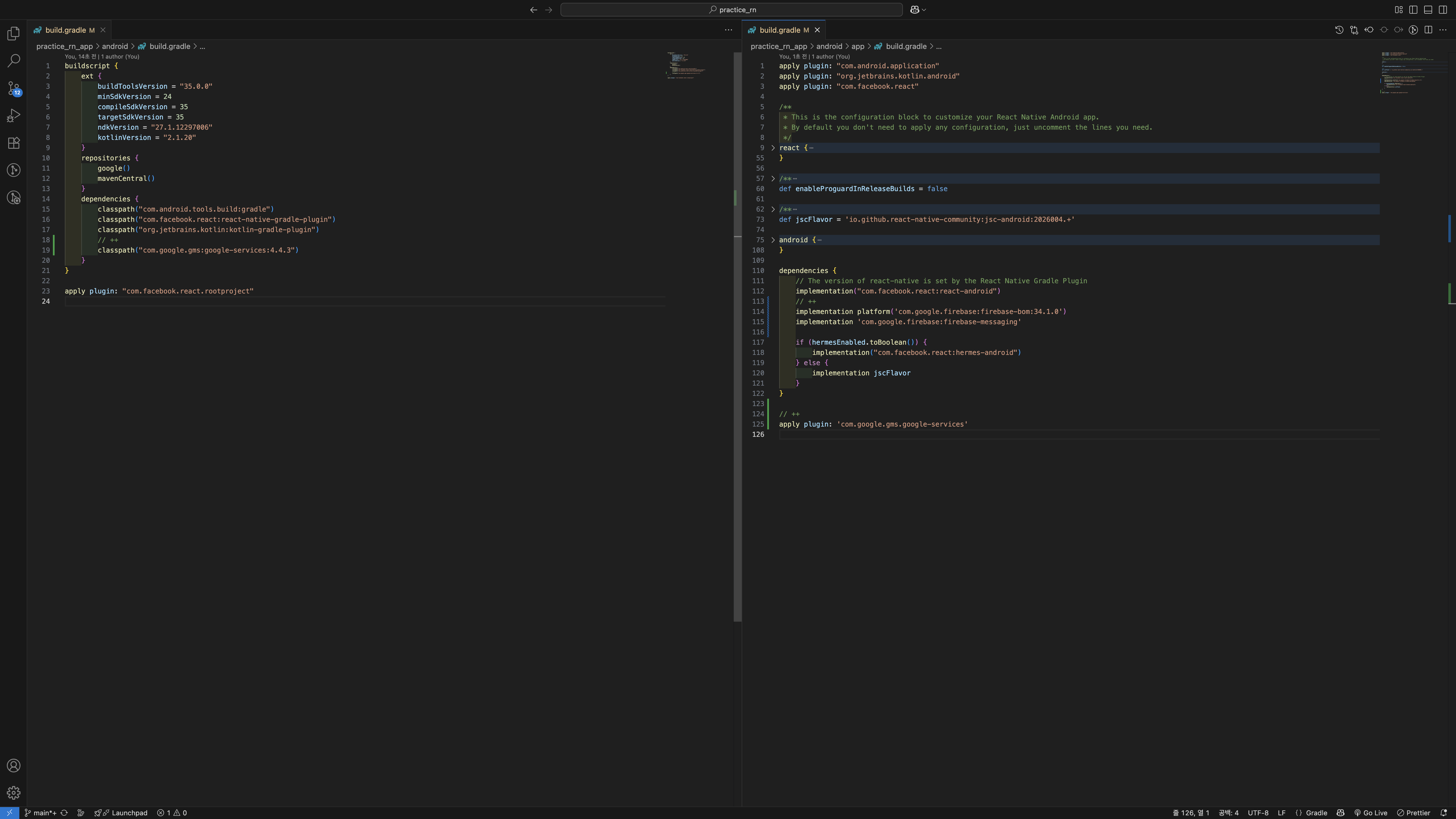
RN 0.80에서 실제로는 이렇게
루트 수준 android/build.gradle
buildscript {
    ext {
        buildToolsVersion = "35.0.0"
        minSdkVersion = 24
        compileSdkVersion = 35
        targetSdkVersion = 35
        ndkVersion = "27.1.12297006"
        kotlinVersion = "2.1.20"
    }
    repositories {
        google()
        mavenCentral()
    }
    dependencies {
        classpath("com.android.tools.build:gradle")
        classpath("com.facebook.react:react-native-gradle-plugin")
        classpath("org.jetbrains.kotlin:kotlin-gradle-plugin")
        // ++
        classpath("com.google.gms:google-services:4.4.3")
    }
}

apply plugin: "com.facebook.react.rootproject"
앱 수준 android/app/build.gradle
apply plugin: "com.android.application"
apply plugin: "org.jetbrains.kotlin.android"
apply plugin: "com.facebook.react"

/**
 * This is the configuration block to customize your React Native Android app.
 * By default you don't need to apply any configuration, just uncomment the lines you need.
 */
react {
    /* Folders */
    //   The root of your project, i.e. where "package.json" lives. Default is '../..'
    // root = file("../../")
    //   The folder where the react-native NPM package is. Default is ../../node_modules/react-native
    // reactNativeDir = file("../../node_modules/react-native")
    //   The folder where the react-native Codegen package is. Default is ../../node_modules/@react-native/codegen
    // codegenDir = file("../../node_modules/@react-native/codegen")
    //   The cli.js file which is the React Native CLI entrypoint. Default is ../../node_modules/react-native/cli.js
    // cliFile = file("../../node_modules/react-native/cli.js")

    /* Variants */
    //   The list of variants to that are debuggable. For those we're going to
    //   skip the bundling of the JS bundle and the assets. By default is just 'debug'.
    //   If you add flavors like lite, prod, etc. you'll have to list your debuggableVariants.
    // debuggableVariants = ["liteDebug", "prodDebug"]

    /* Bundling */
    //   A list containing the node command and its flags. Default is just 'node'.
    // nodeExecutableAndArgs = ["node"]
    //
    //   The command to run when bundling. By default is 'bundle'
    // bundleCommand = "ram-bundle"
    //
    //   The path to the CLI configuration file. Default is empty.
    // bundleConfig = file(../rn-cli.config.js)
    //
    //   The name of the generated asset file containing your JS bundle
    // bundleAssetName = "MyApplication.android.bundle"
    //
    //   The entry file for bundle generation. Default is 'index.android.js' or 'index.js'
    // entryFile = file("../js/MyApplication.android.js")
    //
    //   A list of extra flags to pass to the 'bundle' commands.
    //   See https://github.com/react-native-community/cli/blob/main/docs/commands.md#bundle
    // extraPackagerArgs = []

    /* Hermes Commands */
    //   The hermes compiler command to run. By default it is 'hermesc'
    // hermesCommand = "$rootDir/my-custom-hermesc/bin/hermesc"
    //
    //   The list of flags to pass to the Hermes compiler. By default is "-O", "-output-source-map"
    // hermesFlags = ["-O", "-output-source-map"]

    /* Autolinking */
    autolinkLibrariesWithApp()
}

/**
 * Set this to true to Run Proguard on Release builds to minify the Java bytecode.
 */
def enableProguardInReleaseBuilds = false

/**
 * The preferred build flavor of JavaScriptCore (JSC)
 *
 * For example, to use the international variant, you can use:
 * `def jscFlavor = io.github.react-native-community:jsc-android-intl:2026004.+`
 *
 * The international variant includes ICU i18n library and necessary data
 * allowing to use e.g. `Date.toLocaleString` and `String.localeCompare` that
 * give correct results when using with locales other than en-US. Note that
 * this variant is about 6MiB larger per architecture than default.
 */
def jscFlavor = 'io.github.react-native-community:jsc-android:2026004.+'

android {
    ndkVersion rootProject.ext.ndkVersion
    buildToolsVersion rootProject.ext.buildToolsVersion
    compileSdk rootProject.ext.compileSdkVersion

    namespace "com.practice_rn_app"
    defaultConfig {
        applicationId "com.practice_rn_app"
        minSdkVersion rootProject.ext.minSdkVersion
        targetSdkVersion rootProject.ext.targetSdkVersion
        versionCode 1
        versionName "1.0"
    }
    signingConfigs {
        debug {
            storeFile file('debug.keystore')
            storePassword 'android'
            keyAlias 'androiddebugkey'
            keyPassword 'android'
        }
    }
    buildTypes {
        debug {
            signingConfig signingConfigs.debug
        }
        release {
            // Caution! In production, you need to generate your own keystore file.
            // see https://reactnative.dev/docs/signed-apk-android.
            signingConfig signingConfigs.debug
            minifyEnabled enableProguardInReleaseBuilds
            proguardFiles getDefaultProguardFile("proguard-android.txt"), "proguard-rules.pro"
        }
    }
}

dependencies {
    // The version of react-native is set by the React Native Gradle Plugin
    implementation("com.facebook.react:react-android")
    // ++
    implementation platform('com.google.firebase:firebase-bom:34.1.0')
    implementation 'com.google.firebase:firebase-messaging'

    if (hermesEnabled.toBoolean()) {
        implementation("com.facebook.react:hermes-android")
    } else {
        implementation jscFlavor
    }
}

// ++
apply plugin: 'com.google.gms.google-services'
이러면 android는 우선 SDK를 붙인 거다.
iOS도 해보자
이번에는 iOS를 붙여보자.
- Firebase 콘솔에서 iOS 앱 등록
- 앱 Bundle ID 입력
- GoogleService-Info.plist 파일 다운로드
- 이 파일은 반드시 Xcode에서 프로젝트에 추가해야 한다.
(VSCode에서 드래그만 하면 타깃 멤버십에 안 잡혀서 인식이 안 될 때가 많다.)
SDK 추가? 문서는 SPM 기준
Firebase 공식 문서를 보면 iOS SDK 설치를 Swift Package Manager(SPM) 예시로 설명한다.
👉 하지만 우리는 RN + Cocoapods 환경을 쓰고 있기 때문에, 그대로 따라 하면 안 맞는다.
https://firebase.google.com/docs/ios/installation-methods?hl=ko&authuser=0&_gl=1*1jqdu24*_ga*NDY4NzIzNDAzLjE3NTYxNzMwMDQ.*_ga_CW55HF8NVT*czE3NTYxNzg1MjEkbzIkZzEkdDE3NTYxODAyNTMkajExJGwwJGgw#cocoapods
Apple 앱에 Firebase를 설치하는 옵션 | Firebase for Apple platforms
의견 보내기 Apple 앱에 Firebase를 설치하는 옵션 컬렉션을 사용해 정리하기 내 환경설정을 기준으로 콘텐츠를 저장하고 분류하세요. Swift Package Manager Firebase에서는 새 프로젝트에 Swift Package Manager
firebase.google.com
근데 이대로 해도 에러남.
pod install --repo-update 하는 순간 뭐 static libraries 어쩌고 ~
이게 무슨 말이냐면 "Firebase의 일부 Pod이 정적(static) 라이브러리로 붙으면서 Swift 모듈 맵이 없어서 Swift에서 import가 안 된다."
Cocoapods가 Firebase 의존성들을 정적으로 빌드하려고 하는데, 어떤 것들은 아직 “모듈러 헤더”가 없어서 충돌이 나는 거다.
뭔 소리죠...? 사실 저도 잘 몰라요... 저 좀 이해시켜 줄 사람...?
스택오버플로우에서 하라는 대로 하니까 해결 됐는데 podfile 이렇게 ㄱㄱ
# Resolve react_native_pods.rb with node to allow for hoisting
require Pod::Executable.execute_command('node', ['-p',
  'require.resolve(
    "react-native/scripts/react_native_pods.rb",
    {paths: [process.argv[1]]},
  )', __dir__]).strip

platform :ios, min_ios_version_supported
prepare_react_native_project!

linkage = ENV['USE_FRAMEWORKS']
if linkage != nil
  Pod::UI.puts "Configuring Pod with #{linkage}ally linked Frameworks".green
  use_frameworks! :linkage => linkage.to_sym
end

target 'practice_rn_app' do
  config = use_native_modules!

  use_react_native!(
    :path => config[:reactNativePath],
    # An absolute path to your application root.
    :app_path => "#{Pod::Config.instance.installation_root}/.."
  )

  # ++
  pod 'FirebaseCore', :modular_headers => true
  pod 'GoogleUtilities', :modular_headers => true
  pod 'FirebaseMessaging', :modular_headers => true

  post_install do |installer|
    # https://github.com/facebook/react-native/blob/main/packages/react-native/scripts/react_native_pods.rb#L197-L202
    react_native_post_install(
      installer,
      config[:reactNativePath],
      :mac_catalyst_enabled => false,
      # :ccache_enabled => true
    )
  end
end
마지막으로 AppDelegate에서 Firebase 초기화를 해줘야 한다.
import UIKit
import React
import React_RCTAppDelegate
import ReactAppDependencyProvider
// ++
import FirebaseCore


@main
class AppDelegate: UIResponder, UIApplicationDelegate {
  var window: UIWindow?

  var reactNativeDelegate: ReactNativeDelegate?
  var reactNativeFactory: RCTReactNativeFactory?

  func application(
    _ application: UIApplication,
    didFinishLaunchingWithOptions launchOptions: [UIApplication.LaunchOptionsKey: Any]? = nil
  ) -> Bool {
    let delegate = ReactNativeDelegate()
    let factory = RCTReactNativeFactory(delegate: delegate)
    delegate.dependencyProvider = RCTAppDependencyProvider()

    reactNativeDelegate = delegate
    reactNativeFactory = factory

    window = UIWindow(frame: UIScreen.main.bounds)

    factory.startReactNative(
      withModuleName: "practice_rn_app",
      in: window,
      launchOptions: launchOptions
    )

    // ++
    FirebaseApp.configure()

    return true
  }
}

class ReactNativeDelegate: RCTDefaultReactNativeFactoryDelegate {
  override func sourceURL(for bridge: RCTBridge) -> URL? {
    self.bundleURL()
  }

  override func bundleURL() -> URL? {
#if DEBUG
    RCTBundleURLProvider.sharedSettings().jsBundleURL(forBundleRoot: "index")
#else
    Bundle.main.url(forResource: "main", withExtension: "jsbundle")
#endif
  }
}
일단 이러면 iOS도 SDK는 붙임!
이제 FCM을 써봐야겠죠?
참조: https://rnfirebase.io/messaging/usage
Cloud Messaging | React Native Firebase
Copyright © 2017-2020 Invertase Limited. Except as otherwise noted, the content of this page is licensed under the Creative Commons Attribution 3.0 License, and code samples are licensed under the Apache 2.0 License. Some partial documentation, under the
rnfirebase.io
와... SDK 붙일 때 firebase 문서만 보면서 하느라 삽질했는데, 여기 붙이는 법이 더 상세히 잘 나와있다.
https://rnfirebase.io/
React Native Firebase | React Native Firebase
Welcome to React Native Firebase! To get started, you must first setup a Firebase project and install the "app" module. React Native Firebase has begun to deprecate the namespaced API (i.e firebase-js-sdk < v9 chaining API). React Native Firebase will be m
rnfirebase.io
아.무.튼
먼저 패키지 설치하세요.
npm i @react-native-firebase/app @react-native-firebase/messaging
npm i @notifee/react-native
iOS 먼저 하려는데, 애플 개발자 계정이 있어야 한대요.
아, 저번 달에 만료되고, 재결제 안 했는데.... 아..... ㅆ...
https://rnfirebase.io/messaging/usage/ios-setup
iOS Messaging Setup | React Native Firebase
Copyright © 2017-2020 Invertase Limited. Except as otherwise noted, the content of this page is licensed under the Creative Commons Attribution 3.0 License, and code samples are licensed under the Apache 2.0 License. Some partial documentation, under the
rnfirebase.io
이렇게 하래요.
이미지랑 같이 설명해서 금방 하겠죠? 이건 넘어갈게요.
그럼 코드 던질게요.
// index.js

import { AppRegistry, Platform } from 'react-native';
import App from './App';
import { name as appName } from './app.json';

import { getApp } from '@react-native-firebase/app';
import {
  getMessaging,
  setBackgroundMessageHandler,
} from '@react-native-firebase/messaging';
import notifee, { AndroidImportance } from '@notifee/react-native';

const app = getApp();
const messaging = getMessaging(app);

let channelReady = false;
async function ensureChannel() {
  if (channelReady || Platform.OS !== 'android') return 'default';
  await notifee.createChannel({
    id: 'default',
    name: 'Default',
    importance: AndroidImportance.HIGH,
  });
  channelReady = true;
  return 'default';
}

setBackgroundMessageHandler(messaging, async remoteMessage => {
  if (remoteMessage.notification) {
    return;
  }

  const channelId = await ensureChannel();
  const title = remoteMessage.data?.title ?? 'FCM (bg)';
  const body =
    remoteMessage.data?.body ?? JSON.stringify(remoteMessage.data ?? {});

  await notifee.displayNotification({
    title,
    body,
    ios: {
      foregroundPresentationOptions: { alert: true, sound: true, badge: true },
    },
    android: { channelId, pressAction: { id: 'default' } },
  });
});

AppRegistry.registerComponent(appName, () => App);
// App.tsx

import React, { useEffect } from 'react';
import { NewAppScreen } from '@react-native/new-app-screen';
import {
  StatusBar,
  StyleSheet,
  useColorScheme,
  View,
  Platform,
} from 'react-native';

import { getApp } from '@react-native-firebase/app';
import {
  getMessaging,
  requestPermission,
  AuthorizationStatus,
  registerDeviceForRemoteMessages,
  getToken,
  onMessage,
  onTokenRefresh,
} from '@react-native-firebase/messaging';

import notifee, { AndroidImportance } from '@notifee/react-native';

export default function App() {
  const isDarkMode = useColorScheme() === 'dark';

  useEffect(() => {
    (async () => {
      // notifee 권한 (iOS 배너/사운드 위해)
      await notifee.requestPermission();

      // ANDROID: 헤드업용 채널
      let channelId = 'default';
      if (Platform.OS === 'android') {
        channelId = await notifee.createChannel({
          id: 'default',
          name: 'Default',
          importance: AndroidImportance.HIGH,
        });
      }

      // FCM 준비
      const app = getApp();
      const messaging = getMessaging(app);

      const status = await requestPermission(messaging);
      const enabled =
        status === AuthorizationStatus.AUTHORIZED ||
        status === AuthorizationStatus.PROVISIONAL;

      if (enabled && Platform.OS === 'ios') {
        try {
          await registerDeviceForRemoteMessages(messaging);
        } catch {}
      }

      const token = await getToken(messaging);
      console.log('[FCM] token:', token);

      const unsubToken = onTokenRefresh(messaging, t => {
        console.log('[FCM] token refreshed:', t);
      });

      const unsubMsg = onMessage(messaging, async remoteMessage => {
        const title = remoteMessage.notification?.title ?? 'FCM';
        const body =
          remoteMessage.notification?.body ??
          JSON.stringify(remoteMessage.data ?? {});

        await notifee.displayNotification({
          title,
          body,
          ios: {
            // 포그라운드에서도 배너/사운드/배지 표시
            foregroundPresentationOptions: {
              alert: true,
              sound: true,
              badge: true,
            },
          },
          android: {
            channelId,
            // 헤드업을 더 확실히: 전체 화면 인텐트 대신 기본 중요도 HIGH면 충분
            // pressAction 추가하면 눌렀을 때 앱 열림
            pressAction: { id: 'default' },
          },
        });
      });

      return () => {
        unsubToken();
        unsubMsg();
      };
    })();
  }, []);

  return (
    <View style={styles.container}>
      <StatusBar barStyle={isDarkMode ? 'light-content' : 'dark-content'} />
      <NewAppScreen templateFileName="App.tsx" />
    </View>
  );
}

const styles = StyleSheet.create({ container: { flex: 1 } });
이 코드들이 뭘 뜻하냐?
저도 잘 몰라요. 걍 공식문서에서 v22부터는 이렇게 하래요.
네 빌드해 보니까.

네 토큰을 주네요.
그럼 테스트를 해보겠습니다.
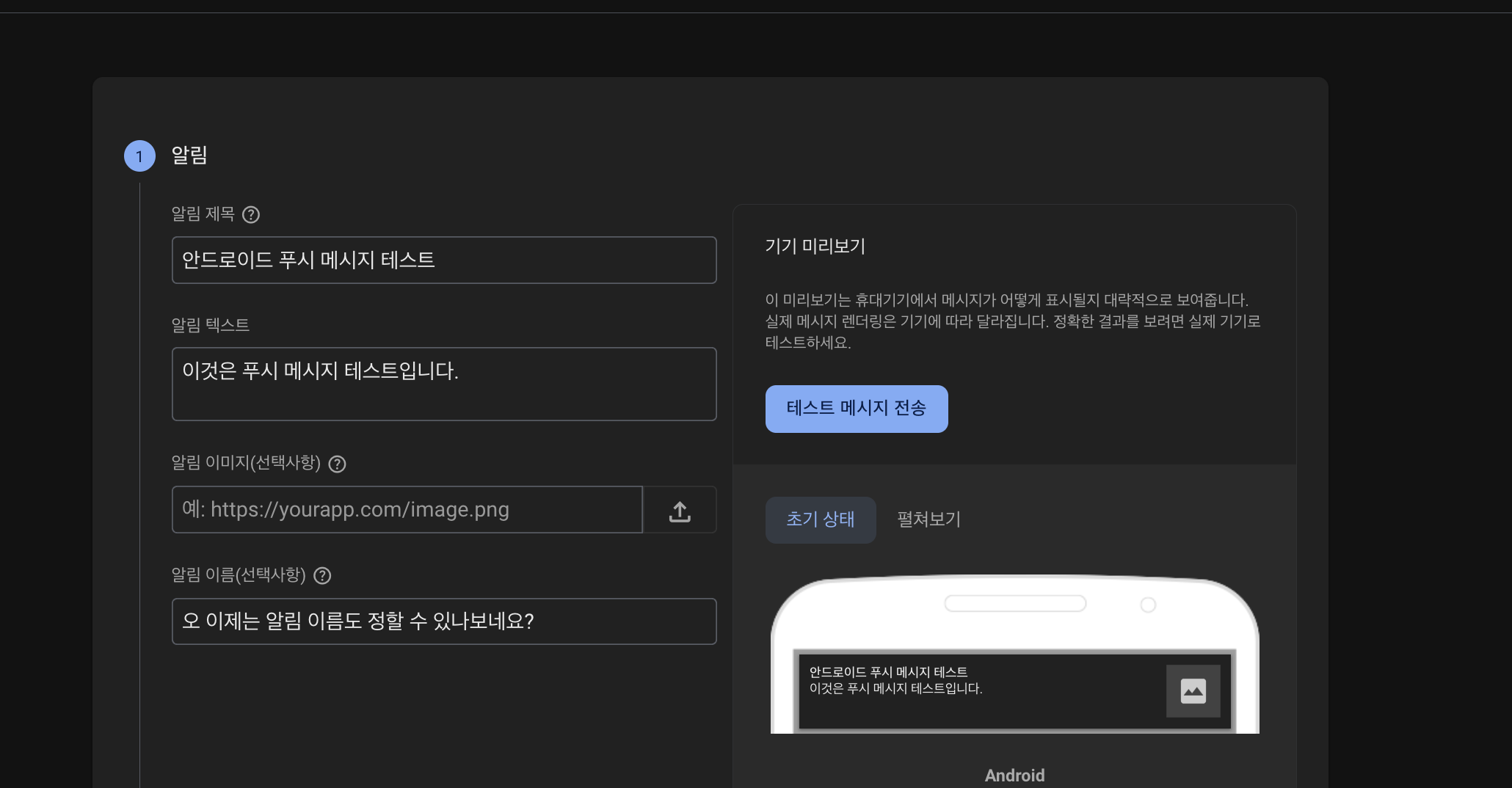


백그라운드 상태일 때, 앱 종료 상태일 때도 문제없이 잘 들어오네요. 👍
1년 새에 뭐가 많이 바뀐 것 같네요ㅎ
다음 시간에는 백엔드도 구현하면서 뱃지도 한 번 달아보도록 하겠습니다.
'React Native' 카테고리의 다른 글
| [RN] Native Module (legacy) (0) | 2025.09.04 |
|---|---|
| [RN] Firebase FCM 02 (4) | 2025.08.26 |
| [RN] react-native-seoul/kakao-login issue (0) | 2025.02.15 |
| [RN] apple login (1) | 2025.02.15 |
| [RN] google login (without firebase) (0) | 2025.02.14 |


